
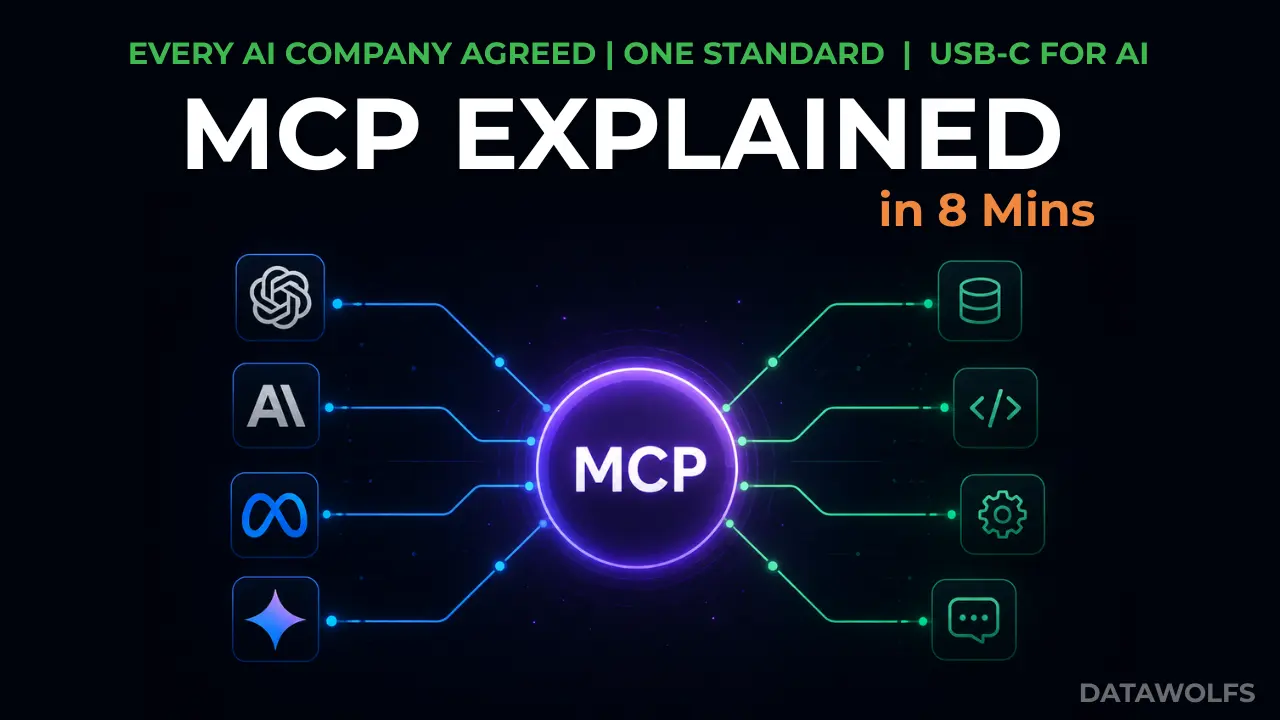
Every major AI company -Anthropic, OpenAI, Google, Microsoft -has agreed on one standard. That almost never happens in tech.
It’s called MCP -the Model Context Protocol. And it’s quietly becoming the most important piece of infrastructure in AI.
Whether you’re building AI apps, connecting databases to LLMs, or just trying to understand what your team is talking about – this guide breaks down exactly what MCP is, how it works, and why it matters to you.
The M×N Integration Nightmare
To get why MCP matters, you need to see the problem it solves.
AI models like Claude, GPT-4, and Gemini are incredibly smart – but they’re born in a bubble. By default, they can’t check your emails, can’t query your database, and can’t look at your files. They have zero context about YOUR world.
So what do developers do? They build custom connectors:
- One custom script to link Claude to GitHub.
- Another to connect ChatGPT to a PostgreSQL database.
- Another to hook up Gemini to Slack.
This works if you have one AI model and one tool. But what happens when the ecosystem grows?
If you have 3 AI models (Claude, ChatGPT, Gemini) and 5 tools (databases, files, email, etc.), you need to build, test, and maintain 15 custom integrations (3 × 5).
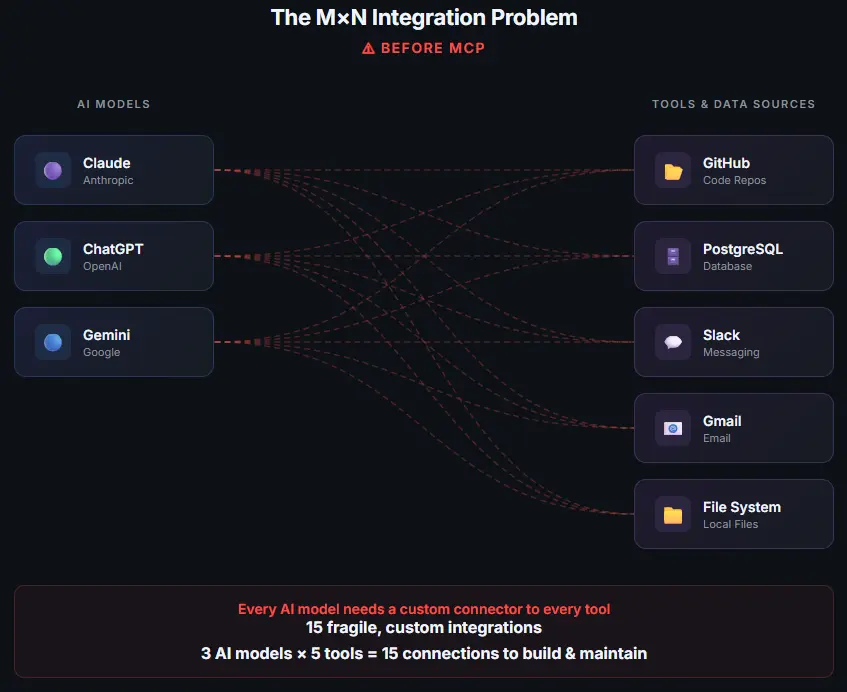
Diagram-showing-the-M×N-integration-problem-—-every-AI-model-needs-a-custom-connector-to-every-tool-creating-15-fragile-connections
Add one more tool? You write 3 new connectors. Add a new model? You rebuild 5.
This is the M×N integration nightmare. Every connector is fragile, custom-coded, and breaks the moment an API changes. It’s a mess.
So how do you fix this? You do what the tech industry has done before – you create a standard.
The Solution: USB-C for AI
Think about USB-C. Before it existed, every phone had a different charger. Every laptop had different ports. You needed a drawer full of cables just to charge your devices.
Then USB-C came along: one port, one cable, everything connects. Done.
MCP is USB-C – but for AI.
One standard protocol that lets any AI application connect to any tool or data source. Build the connector once, and it works everywhere.
- Each AI model only needs one MCP client to speak the protocol.
- Each tool or data source only needs one MCP server to expose its data.
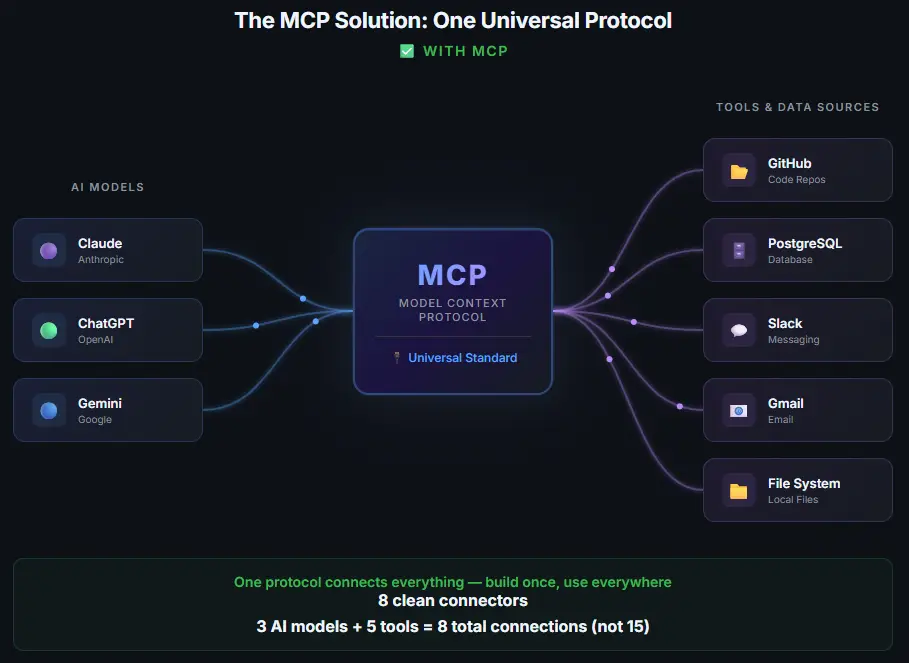
Diagram-showing-MCP-solution-—-all-AI-models-and-tools-connect-through-a-single-universal-protocol-reducing-15-connections-to-8
Instead of 15 custom integrations, you only need 8 (3 + 5). Add a new tool? You build one MCP server — and every AI app can use it instantly. No rebuilding.
MCP Architecture: Host, Client, and Server
Here’s the good news — under the hood, MCP is surprisingly simple. It runs on JSON-RPC 2.0 and has just three core components:
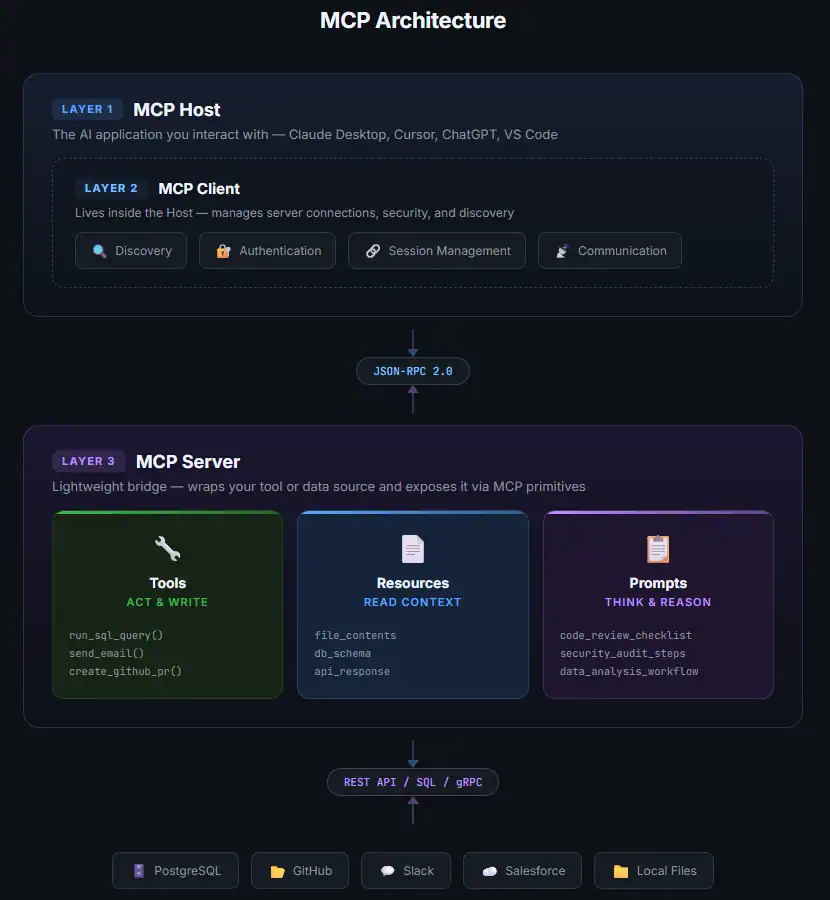
1. The MCP Host
This is the AI application you’re actually using. Claude Desktop, ChatGPT, Cursor, VS Code — whatever has the LLM inside it. Think of it as the “shell” that the user interacts with.
2. The MCP Client
The client lives inside the Host. Its job is to handle security, establish connection sessions, and ask MCP servers: “What can you do?” It handles all the discovery and authentication so the model doesn’t have to.
3. The MCP Server
The server is the bridge to the outside world. Each MCP server wraps a specific tool or data source — a database, a file system, GitHub, Slack, whatever — and exposes it through the MCP protocol.
The beauty? MCP servers are lightweight and modular. You can add a new capability by just spinning up a new server. No changes to the host needed.
Servers can run locally on your machine (using STDIO) or remotely in the cloud (using SSE or WebSockets).
The Three Primitives: Tools, Resources, and Prompts
MCP servers expose three types of capabilities — the protocol calls them primitives. This is how the AI interacts with the outside world:
| Primitive | What It Is | What It Does | Real-World Examples |
|---|---|---|---|
| 🔧 Tools | Executable actions | Let the AI act and write — perform operations (with user confirmation) | run_sql_query, send_slack_message, create_github_pr |
| 📄 Resources | Read-only context | Let the AI read and pull data into its context window | Log files, local documents, API responses, database schemas |
| 📋 Prompts | Structured playbooks | Standardized templates that tell the AI how to think about a task | A “code review” template that says: check security → performance → style |
Here’s the one-liner to remember: Tools let the AI ACT. Resources let the AI KNOW. Prompts let the AI THINK in structured ways.
Together, they turn a generic AI into a specialized, capable assistant.
How This Looks in Practice: MCP Server Setup
Adding an MCP server is as simple as a few lines of JSON. For example, if you want to give Claude Desktop the ability to query a local SQLite database, you add this to your claude_desktop_config.json file:
{
  "mcpServers": {
    "sqlite": {
      "command": "uvx",
      "args": [
        "mcp-server-sqlite",
        "--db-path",
        "/Users/username/data/production.db"
      ]
    }
  }
}
The next time Claude Desktop starts, the MCP client connects to the SQLite server, discovers the available tables, and exposes them as resources (to read schemas and data) and tools (to run queries). That’s it — no SDK, no API key juggling, no custom code.
💡 Want a full MCP server setup tutorial? Check out the Official MCP Documentation for step-by-step guides with Python, TypeScript, and more.
MCP vs API: What’s the Difference?
If you’re a developer, you might be wondering: “Is this just a glorified REST API?”
Not quite. Traditional APIs are designed for human programmers who read documentation and write exact calls. MCP is designed for AI models that discover capabilities at runtime and decide when to use them.
| Feature | Traditional API (REST) | Model Context Protocol (MCP) |
|---|---|---|
| Designed for | Human developers | LLMs and AI agents |
| Discovery | Static (requires reading docs) | Dynamic (discovered at runtime) |
| Philosophy | Tell the code exactly what to do | Tell the AI what tools exist; let it decide |
| State | Stateless requests | Stateful sessions |
| Standardization | Varies wildly (REST, GraphQL, gRPC) | One uniform standard (JSON-RPC 2.0) |
Here’s the key insight: MCP doesn’t replace APIs — it wraps them. Your MCP server does the hard work of calling the GitHub or Salesforce API behind the scenes, and returns a clean package that an LLM can parse instantly.
Think of it this way: APIs are for code talking to code. MCP is for AI reasoning about what tools are available and choosing the right one.
Real-World Example: Coding with Cursor
Let’s make this concrete. Imagine you’re a developer using Cursor — the AI-powered code editor — connected to MCP servers for GitHub and your local file system.
You type: “Find the bug in my authentication code and fix it.”
Without MCP, Cursor can only see the files you currently have open. It’s guessing based on limited context.
With MCP, here’s what happens behind the scenes:
- Discovery — Cursor’s MCP client checks what servers are available. It finds a GitHub server, a file system server, and a database server.
- Context gathering — The AI reasons about your request and decides it needs to pull the auth module files and check recent git commits for changes.
- Data retrieval — The MCP servers return the requested data. The AI now has the full authentication code AND the git history showing what changed recently.
- Reasoning — With complete context, the AI identifies the bug — a missing null check introduced in last Tuesday’s commit — and generates the fix.
- Action — The AI uses a Tool exposed by the GitHub MCP server to create a new branch, commit the fix, and open a Pull Request.
That entire flow — discovery, context gathering, reasoning, and action — happened through MCP. No custom integration code. No API wrangling. Just a standard protocol doing its job.
Why MCP Matters (To Everyone)
MCP isn’t just a developer tool. It’s the infrastructure layer that makes AI actually useful in the real world.
💻 For Developers
Build an MCP server once for your internal tool, and every AI application your company uses — Claude, ChatGPT, Cursor, custom internal agents — can all access it instantly. No more maintaining separate SDKs for different AI providers.
📊 For Data Analysts & Data Engineers
Imagine your AI assistant can query your data warehouse, pull fresh numbers, and build visualizations — all without you writing a single SQL query. That’s MCP connecting your BI tools to your AI. If you work with Snowflake, BigQuery, or PostgreSQL, MCP servers already exist for these.
🏢 For Businesses & Teams
MCP is why your AI assistant will soon be able to book meetings, file expense reports, and answer questions about company data — without someone building custom integrations for each task. And because MCP servers can run locally (STDIO), your sensitive data and credentials never leave your firewall. Only the specific query results are passed to the model.
🤖 For the AI Agents Ecosystem
As AI agents become more autonomous — capable of multi-step reasoning and tool use — MCP becomes the standard way they interact with the world. Every major framework for building AI agents (LangChain, CrewAI, AutoGen) is adding MCP support. It’s becoming the plumbing of agentic AI.
The Future of MCP
Here’s a quick timeline of how MCP went from a single company’s project to an industry standard:
| Date | Milestone |
|---|---|
| Late 2024 | Anthropic (the company behind Claude) releases MCP as an open-source protocol |
| Early 2025 | OpenAI adds MCP support to ChatGPT and its Agents SDK |
| Mid 2025 | Google builds MCP into Gemini API and Vertex AI. Microsoft, AWS, and Cloudflare join. |
| Late 2025 | MCP is donated to the Agentic AI Foundation (AAIF) under the Linux Foundation — co-founded by Anthropic, OpenAI, and Block |
| 2026 | MCP is a model-agnostic, open-governance industry standard. Developer tools (Cursor, VS Code, JetBrains, Zed, Windsurf) all support it natively. |
The bottom line? MCP is doing for AI what HTTP did for the web. It’s the protocol that makes everything connect.
And it’s only going to become more important as AI agents become more capable.
Frequently Asked Questions
What does MCP stand for?
MCP stands for Model Context Protocol. It’s an open standard that provides a universal way for AI applications (like Claude, ChatGPT, or Cursor) to connect to external tools and data sources.
Who created MCP?
MCP was created by Anthropic (the company behind Claude) in late 2024. It’s now governed by the Agentic AI Foundation (AAIF) under the Linux Foundation, co-founded by Anthropic, OpenAI, and Block, with backing from Google, Microsoft, AWS, and Cloudflare.
Is MCP free and open source?
Yes. MCP is a fully open standard with an open-source specification. Anyone can build MCP servers and clients without licensing fees. The specification and reference implementations are available on GitHub.
What’s the difference between MCP and a REST API?
Traditional REST APIs are designed for human developers who write explicit code calls. MCP is designed for AI models — it lets them discover tools at runtime and decide when to use them autonomously. MCP doesn’t replace APIs; it wraps them, making existing APIs consumable by AI.
What AI tools and apps support MCP?
As of 2026, MCP is supported by all major AI platforms and developer tools including: Claude (Anthropic), ChatGPT (OpenAI), Gemini (Google), Cursor, VS Code, JetBrains, Zed, and Windsurf. The list is growing rapidly.
How do I get started with MCP?
The fastest way to get started is to add a pre-built MCP server to Claude Desktop or Cursor by editing a JSON config file. Check out the Official MCP Docs for a quickstart guide, or browse the library of community-built servers on GitHub.
Keep Learning
- 📺 Watch the video: What is MCP? Model Context Protocol Explained Simply — full animated visual breakdown using Manim
- 📚 Official Docs: modelcontextprotocol.io
- ⚙️ Pre-built MCP Servers: github.com/modelcontextprotocol/servers
- 📰 Anthropic’s MCP Announcement: anthropic.com/news/model-context-protocol
What AI concept should we break down next? Drop a comment below — we read every one.
No fluff, just clear explanations you can actually use. That’s Datawolfs.